

Holds are indicators placed on your record that can prevent you from taking certain actions (e.g., enrolling in classes or requesting a transcript).
Notifications are reminders or messages on your student record that usually do not prevent you from enrolling in classes or completing other campus activities. They may let you know about your current status or remind you to take action to avoid getting a hold (e.g., Student Success Workshop)
Below is a list of holds and notifications, along with information on how to resolve or remove them. You’ll also find a screenshot showing where to view them in your Student Dashboard.
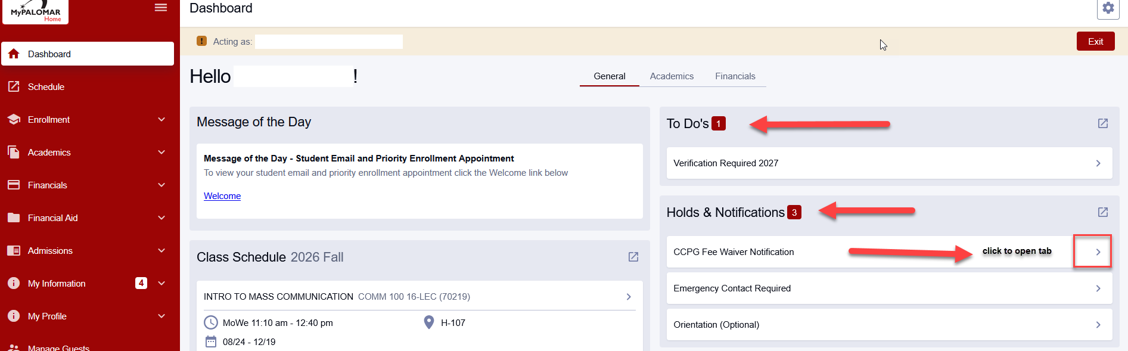
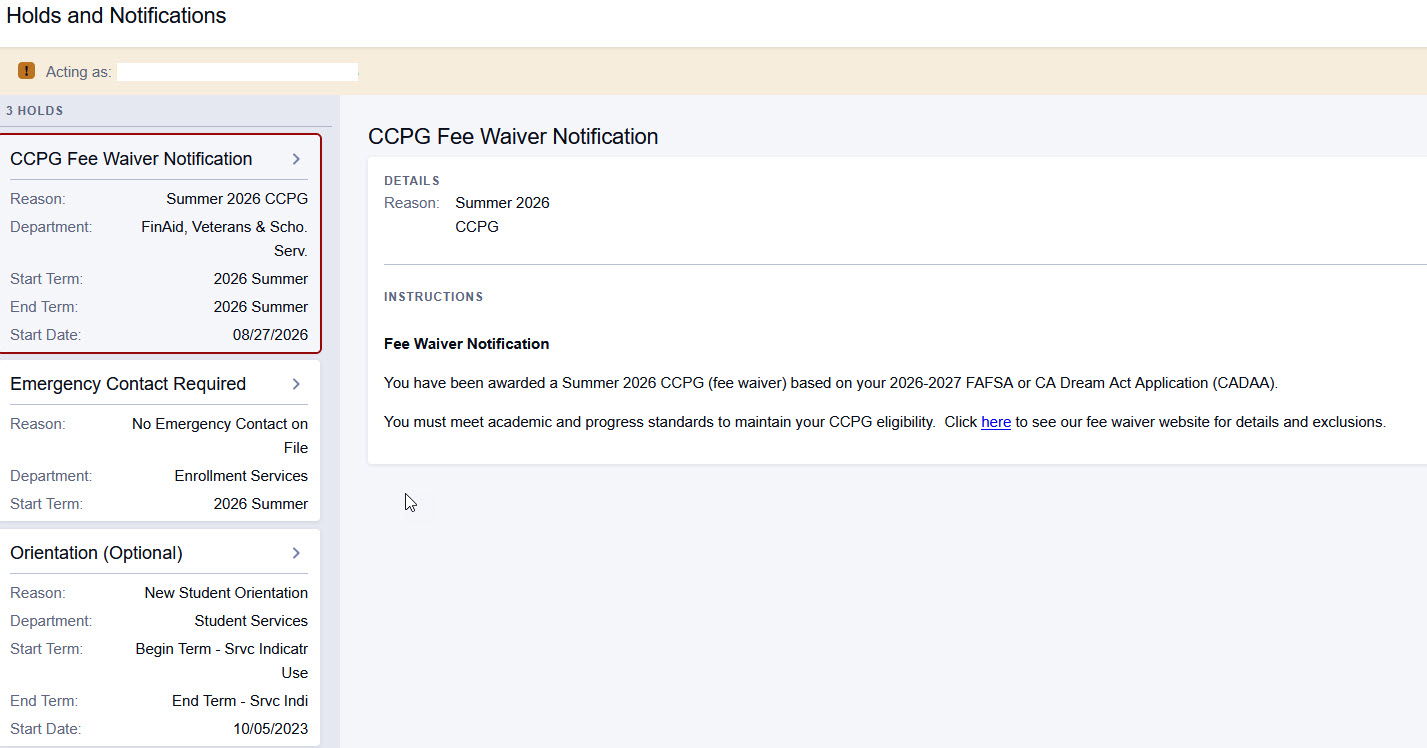
| Service Indicator Code | What does it do, and how can I get it removed? | How to Find Holds and Notifications |
|---|---|---|
| Academic Dismissal (ACD) | Prevents you from enrolling in classes. Student must sit out 1 primary term and petition for reinstatement. | Check your email for a message from the Office of Admissions and check your MyPalomar Student Dashboard for more information. |
| Student Success Workshop (ACP) | May prevent you from enrolling in classes. Student must complete an Academic Success workshop or meet with a counselor. | Check your email for a message from the Office of Admissions and check your MyPalomar Student Dashboard for more information. |
| Address Hold (ADR) | May prevent you from enrolling in classes. Student must verify CA address with Admissions. | Check your email for a message from the Office of Admissions and check your MyPalomar Student Dashboard for more information. |
| Need Bio/Demo Data Update (APP) | Prevents you from enrolling in classes. Student must show valid government issued ID to resolve name or date of birth. | Check your email for a message from the Office of Admissions and check your MyPalomar Student Dashboard for more information. |
| Student Loan Default (DEF) | Prevents you from receiving Federal Financial Aid. Student has defaulted on a loan. May or may not impact enrollment. Student will need to check with Admissions/FA. | Check your email for a message from the Office of Financial Aid and check your MyPalomar Student Dashboard for more information. |
| Disciplinary Hold (DIS) | May prevent you from enrolling in classes. Student must meet with SLL before hold can be removed. | Check your email for a message from the Office of Student Life and Leadership and check your MyPalomar Student Dashboard for more information. |
| DRC Equipment Hold (DSP) | May prevent you from enrolling in classes. Student must return borrowed equipment to DRC. | Check your email for a message from the Office of Disability Resource Center and check your MyPalomar Student Dashboard for more information. |
| EOPS Bad Debt (EBD) | May prevent you from enrolling in classes. Student must pay money back to Cashiers/EOPS. | Check your email for a message from theOffice of Cashier and check your MyPalomar Student Dashboard for more information. |
| Enrollment Blocking (EBI) | Prevents you from enrolling in classes. Student must pay outstanding fees or enter into a payment plan. | Check your email for a message from the Office of Cashier and check your MyPalomar Student Dashboard for more information. |
| Athletics Equipment Hold (EQP) | May prevent you from enrolling in classes. Student must return athletic equipment to Athletics. | Check your email for a message from the Office of Athletics and check your MyPalomar Student Dashboard for more information. |
| Library Books and Fines (LIB) | May prevent you from enrolling in classes. Student must return library book or pay fine. | Check your email for a message from the Palomar College Library and check your MyPalomar Student Dashboard for more information. |
| Locker Hold (LOK) | May prevent you from enrolling in classes. Student must clear hold through SLL. | Check your email for a message from the Office of Student Life and Leadership and check your MyPalomar Student Dashboard for more information |
| Multiple IDs (MID) | May prevent you from enrolling in classes. Student may have 2 or more ID#’s. Must see Admissions office with government issued ID and SSN card to verify identity. | Check your email for a message from the Office of Admissions and check your MyPalomar Student Dashboard for more information. |
| Verify Name (NAM) | Prevents you from enrolling in classes. Student must show government ID at Admission Office to confirm correct name is on file. | Check your email for a message from the Office of Admissions and check your MyPalomar Student Dashboard for more information. |
| Financial Aid Overpay (OVR) | Prevents you from receiving Federal Financial Aid. Student must repay FA funds. May or may not impact enrollment. Refer student to Admissions/FA. | Check your email for a message from the Office of Financial Aid and check your MyPalomar Student Dashboard for more information. |
| Return to Title IV (RT4) | Prevents you from receiving Federal Financial Aid. Student must repay FA funds. May or may not impact enrollment. Refer student to Admissions/FA. | Check your email for a message from the Office of Financial Aid and check your MyPalomar Student Dashboard for more information. |
| Student Activities Hold (SAH) | May prevent you from enrolling in classes. Student must clear through SLL. | Check your email for a message from the Office of Student Life and Leadership and check your MyPalomar Student Dashboard for more information. |
| Proof of SSN/NID (SSN) | Prevents you from enrolling in classes. Conflicting SSN information. Student must show government issued ID and SSN card to Admissions in person. | Check your email for a message from the Office of Admissions and check your MyPalomar Student Dashboard for more information. |
| Student Under 16 (U6) | Prevents you from enrolling in classes. Student must submit a K-12 form to Admissions before registering. | Check your email for a message from the Office of Admissions and check your MyPalomar Student Dashboard for more information. |
| Student Under 18 (U18) | Prevents you from enrolling in classes. Student must submit a K-12 form or verify graduation date from high school to Admissions before registering. | Check your email for a message from the Office of Admissions and check your MyPalomar Student Dashboard for more information. |
| Block All Service Activities (ZBL) | Prevents you from enrolling in classes. Student must see Admissions Manager to register | Check your email for a message from the Office of Admissions and check your MyPalomar Student Dashboard for more information. |
| Financial Aid Disbursement Status (FAH) Notification | Disbursement Notification You are either not enrolled in (Term) classes or are enrolled in classes that begin on or after (Term Start Date). Financial Aid Freeze Date Information | Check your email for a message from the Office of Financial Aid and check your MyPalomar Student Dashboard for more information. |
| CCPG Fee Waiver Notification (CCPG) Notification | Fee Waiver Notification You have been awarded a (Summer Term) Fee Waiver based on FAFSA or CA Dream Act Application (CADAA). You must meet academic progress standards to maintain your CCPG eligibility. | Check your email for a message from the Office of Financial Aid and check your MyPalomar Student Dashboard for more information. |
| Emergency Contact Required (EMG) Notification | Emergency Contact Notification Records indicate that you do not currently have an emergency contact on file. | Check your MyPalomar Student Dashboard for more information. |
| Orientation (ORT) Notification | New Student Orientation Notification (Optional). | Check your MyPalomar Student Dashboard for more information. |
| Title IX Required Training (TL9) | Title IX Required Training Notification Newly enrolled students will have access 24 hours after enrollment. (Required Per AB-2683). | Check your MyPalomar Student Dashboard for more information. |
Last modified on September 14, 2026